Zustandsverwaltung
Was ist Zustandsverwaltung?
Technisch gesehen „verwaltet“ jede Vue-Komponenteninstanz bereits ihren eigenen reaktiven Zustand. Nehmen wir als Beispiel eine einfache Zählerkomponente:
vue
<script setup>
import { ref } from 'vue'

// state
const count = ref(0)

// actions
function increment() {
  count.value++
}
</script>

<!-- view -->
<template>{{ count }}</template>Es handelt sich um eine eigenständige Einheit, die aus folgenden Teilen besteht:
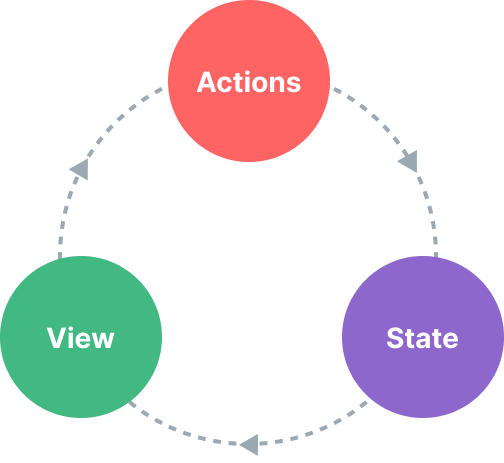
- Der Zustand, die Quelle der Wahrheit, die unsere App antreibt;
- Die Ansicht, eine deklarative Abbildung des Zustands;
- Die Aktionen, also die möglichen Arten, wie sich der Zustand als Reaktion auf Benutzereingaben aus der Ansicht ändern könnte.
Dies ist eine einfache Darstellung des Konzepts des „einseitigen Datenflusses“:
Diese Einfachheit bröckelt jedoch, wenn wir es mit mehreren Komponenten zu tun haben, die sich einen gemeinsamen Zustand teilen:
- Mehrere Ansichten können von demselben Zustandswert abhängen.
- Aktionen aus verschiedenen Ansichten müssen möglicherweise denselben Zustand ändern.
Im ersten Fall besteht eine mögliche Abhilfe darin, den gemeinsam genutzten Zustand auf eine übergeordnete Komponente zu „heben“ und ihn dann als Props weiterzugeben. In Komponentenbäumen mit tiefen Hierarchien wird dies jedoch schnell mühsam, was zu einem weiteren Problem führt, das als Prop Drilling bekannt ist.
Im zweiten Fall greifen wir oft auf Lösungen zurück, wie beispielsweise den Zugriff auf direkte über- und untergeordnete Instanzen über Template-Referenzen oder den Versuch, mehrere Kopien des Zustands über ausgelöste Ereignisse zu ändern und zu synchronisieren. Beide Muster sind anfällig und führen schnell zu nicht wartbarem Code.
Eine einfachere und übersichtlichere Lösung besteht darin, den gemeinsam genutzten Zustand aus den Komponenten herauszulösen und ihn in einem globalen Singleton zu verwalten. Dadurch wird unser Komponentenbaum zu einer großen „Ansicht“, und jede Komponente kann auf den Zustand zugreifen oder Aktionen auslösen, ganz gleich, wo sie sich im Baum befindet!
Simple State Management with Reactivity API
If you have a piece of state that should be shared by multiple instances, you can use reactive() to create a reactive object, and then import it into multiple components:
js
// store.js
import { reactive } from 'vue'

export const store = reactive({
  count: 0
})
vue
<!-- ComponentA.vue -->
<script setup>
import { store } from './store.js'
</script>

<template>From A: {{ store.count }}</template>
vue
<!-- ComponentB.vue -->
<script setup>
import { store } from './store.js'
</script>

<template>From B: {{ store.count }}</template>Now whenever the store object is mutated, both <ComponentA> and <ComponentB> will update their views automatically - we have a single source of truth now.
However, this also means any component importing store can mutate it however they want:
template
<template>
  <button @click="store.count++">
    From B: {{ store.count }}
  </button>
</template>
While this works in simple cases, global state that can be arbitrarily mutated by any component is not going to be very maintainable in the long run. To ensure the state-mutating logic is centralized like the state itself, it is recommended to define methods on the store with names that express the intention of the actions:
js
// store.js
import { reactive } from 'vue'

export const store = reactive({
  count: 0,
  increment() {
    this.count++
  }
})
template
<template>
  <button @click="store.increment()">
    From B: {{ store.count }}
  </button>
</template>TIP
Note the click handler uses store.increment() with parentheses - this is necessary to call the method with the proper this context since it's not a component method.
Although here we are using a single reactive object as a store, you can also share reactive state created using other Reactivity APIs such as ref() or computed(), or even return global state from a Composable:
js
import { ref } from 'vue'

// global state, created in module scope
const globalCount = ref(1)

export function useCount() {
  // local state, created per-component
  const localCount = ref(1)

  return {
    globalCount,
    localCount
  }
}
The fact that Vue's reactivity system is decoupled from the component model makes it extremely flexible.
SSR Considerations
If you are building an application that leverages Server-Side Rendering (SSR), the above pattern can lead to issues due to the store being a singleton shared across multiple requests. This is discussed in more details in the SSR guide.
Pinia
While our hand-rolled state management solution will suffice in simple scenarios, there are many more things to consider in large-scale production applications:
- Stronger conventions for team collaboration
- Integrating with the Vue DevTools, including timeline, in-component inspection, and time-travel debugging
- Hot Module Replacement
- Server-Side Rendering support
Pinia is a state management library that implements all of the above. It is maintained by the Vue core team, and works with both Vue 2 and Vue 3.
Existing users may be familiar with Vuex, the previous official state management library for Vue. With Pinia serving the same role in the ecosystem, Vuex is now in maintenance mode. It still works, but will no longer receive new features. It is recommended to use Pinia for new applications.
Pinia started out as an exploration of what the next iteration of Vuex could look like, incorporating many ideas from core team discussions for Vuex 5. Eventually, we realized that Pinia already implements most of what we wanted in Vuex 5, and decided to make it the new recommendation instead.
Compared to Vuex, Pinia provides a simpler API with less ceremony, offers Composition-API-style APIs, and most importantly, has solid type inference support when used with TypeScript.